Theme studio for Brams Keyboard with per-key control
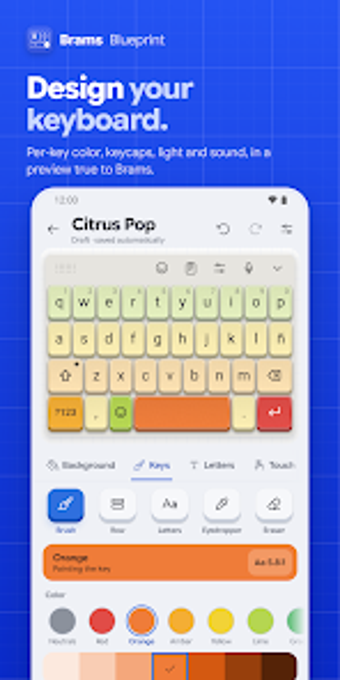
Brams Blueprint lets you design and preview keyboard themes with per-key color, shape, lighting, and sound in real time. Created by Adrien Maciel for the Brams Keyboard ecosystem, the app targets Android users who want mechanical keyboard aesthetics on mobile. It offers key-by-key customization, authentic switch sound profiles, and a community gallery with a non-monetary credit system, making it suitable for enthusiasts who value granular visual and acoustic control over a typing interface.
What the studio changes about your typing surface
Blueprint modifies the keyboard appearance and feedback rather than acting as an input method: it generates themes applied through Brams Keyboard or Brams Keyboard Lite. The app provides a real-time preview across multiple layouts, a contrast warning to protect readability, and a community showcase where themes can be published or retrieved with a seven-digit sharing code.
How deep the customization goes
The app gives key-by-key design control, letting you set colors for letters, function keys, and symbols, choose keycap shapes and profiles, and assign RGB lighting rules. You can also pick from integrated mechanical switch sound profiles for acoustic feedback. These options let users alter geometry, illumination, and audio per key or across grouped selections.
What it demands from your device and setup
Blueprint runs on Android and requires Brams Keyboard or its Lite variant to apply themes, so it does not replace the system keyboard. The editor previews themes locally before export, and the app's workflow depends on having the companion keyboard installed. The community economy operates via Brams Points, earned by typing in the ecosystem, rather than traditional payments.
How easy it is to start and share creations
The editor exposes granular controls without hidden menus: color pickers, shape selectors, and sound presets appear in the theme canvas, and publishing uses a gallery interface with download and code sharing. Exported themes use a unique seven-digit code for direct sharing, and the gallery lets users browse and acquire creations using earned Brams Points.
Clear fit for customization-minded keyboard enthusiasts
Blueprint is a practical design tool for Android users who already run Brams Keyboard and who want exact control over visual, geometric, and acoustic keyboard elements. It demands the companion keyboard to function and centers community exchange on activity-based credits rather than payments, which may matter for users expecting conventional storefronts. For people seeking per-key styling and audible switch profiles, Blueprint delivers a focused studio experience.